
Vocabug-lite
docs
Contents
- About Vocabug-lite
- Interface
- Overall structure
- Categories
- Building words
- The alphabet directive
- The graphemes directive
- The stage directive
- The change
- Reject
- Insertion and deletion
- Alternator and Optionalator
- Cluster-field
1About Vocabug-lite
This is the complete documentation for Vocabug-lite
This is a word generator similar to to the Williams' Lexifer and to the legendary Awkwords. As the name implies, Vocabug-lite, is the 'lite' version of the full Vocabug.
Vocabug randomly generates vocabulary from a given definition of graphemes, frequencies and word patterns. You can use it to make words for a constructed language, to get an original nickname or password, or just for fun.
2Interface
- Use the
Generatebutton to see Vocabug produce words. If this button is greyed out it means that Vocabug is busy generating words - Use the
Copybutton to copy the words to the clipboard - Use the
Clearbutton to clear all fields and generated words Helpshows this document
2.1Options
- Use the
Number of wordstextbox to choose the number of words to generate. The default number is 100 Word-list modewill produce a list of wordsParagraph modewill produce words that look vaguely like sentences by injecting punctuation into the word list and capitalising the first word of each sentenceDebug modewill show, line by line, each step in creating each wordRemove duplicateswill make sure all words generated are uniqueSort wordsandCapitalise wordsshould be self explanatory- The
Word dividertextbox sets the delimiter, or in other words, what the content will be between each word in the output. It is a space "\nto get one word for each line
2.2File save / load
- Use the
Savebutton to download the definition-build as a file called 'vocabug.txt', or whatever you named your file in theFile name:field. The file is always a ".txt" type - Use the
Loadbutton to load a file from your system into the definition-build editor
3Overall structure
A definition-build is comprised of two top-level concepts: 'directives' and 'decorators'.
Directives are define the functions of Vocabug. The primary directives are the words directive, which creates each word, and the stage directive, which modifies each word with transforms. The other directives define concepts that are used by these primary directives.
Decorators change a property of a directive to modify the directive's behaviour such as the distribution.
3.2About graphemes
Graphemes are indivisible meaningful characters that make a generated word in Vocabug. Phonemes can be thought of as graphemes. If we use English words sky and shy as examples to illustrate this, sky is made up by the graphemes s + k + y, while shy is made up by sh + y.
3.3Escaping characters
A single-length character following the syntax character \ ignores any meaning it might have had in the generator, including backslashes themselves. This way, anything including capital letters that have already been defined as categories, brackets, even spaces can be graphemes.
4Categories
Categories are declared inside the categories directive on a line each. A category is a set of graphemes with a key. The key is a singular-length capital letter. For example:
:C = t, n, k, m, ch, l, ꞌ, s, r, d, h, w, b, y, p, g F = n, l, ꞌ, t, k, r, p V = a, i, e, u, o
This creates three groups of graphemes. C is the group of all consonants, V is the group of all vowels, and F is the group of some of the consonants that will be used syllable finally.
These graphemes are separated by commas, however an alternative is to use spaces: C = t n k m ch l ꞌ s r d h w b y p g.
By default, the graphemes' frequencies decrease as they go to the right, according to the Gusein-Zade distribution. You can change this distribution with a decorator on the words directive, read how to do this here. In the above example, when Vocabug needs to choose a V, it will choose a the most at 43%, i the second-most at 26%, e the third-most at 17%, u the fourth-most at 10%, and o the fifth most at 4%.
4.1Categories inside categories and set-categories
You can use categories inside categories, as long as the referenced category has previously been defined. For example:
@categories.distribution = flat
categories:
L = aa, ii, ee, oo
V = a, i, e, o, LIn the example above, V has a 20% chance of being a long vowel.
You can also enclose a set of graphemes in curly braces { and }. This is called a 'set-category'. This set will be treated as if it were a reference to a category in terms of frequency. For example, we could write the same example as this:
@categories.distribution = flat
categories:
V = a, i, e, o, {aa, ii, ee, oo}Assigning weights to categories in categories and set-categories is possible.
Categories inside categories and set-categories CANNOT be a part of any sequence. for example C = Xz or C = x{c, d} or C = {a, b}{c, d} will not give the results you might want. To get sequence-like behaviour like that, you will need to use units.
4.2Null grapheme
If a word is built using the syntax character ^, it will disappear in the generated word. In other words ^ is a null grapheme. If you want to use ^ as a grapheme, you will need to escape it. To use other syntax characters as graphemes, they must be escaped too.
5Building words
5.1Words
The words directive defines a set of 'word-shapes' that Vocabug will choose from to create words. A word-shape can consist of individual graphemes, categories, units or a mixture of both.
Word-shapes are separated by a comma, space, or a newline.
By default, words are selected using the Zipf distribution. The first word-shape will be chosen the most often, then the second word-shape the second most often and so on. You can change this distribution. Below is a very simple example that will generate words with one to three CV syllables:
:
C = t, n, k, m, l, s, r, d, h, w, b, j, p, g
V = a, i, o, e, u
words:
CV,CVCV
, CVCVCV,
; This is a commentV
5.2Units
Units are a system that provides an abbreviation of parts of a word-shape. Typically you use it to define the shape of a syllable. Units are defined similarly to categories, but with several important differences:
- Every unit's key is uppercase A to Z or
$ - Units are evoked in the
wordsdirective or inside another unit inside angle brackets<and>. - Units are not sets like categories are.
$ = a, b, cwill not work as you might expect (because as already stated, units are abbreviation for word-shapes). You would need to use a pick-one-set, i.e:<M> = {a, b, c}
For example you could write the last example like so:
:
C = t, n, k, m, l, s, r, d, h, w, b, j, p, g
V = a, i, o, e, u
units:
$ = CVVowel-only = V words
:
<$><$>, <$>, <$><$><$>, <Vowel-only>You can put units inside units. For example: Example = $$
5.3Pick-one-set
A pick-one-set is a group of graphemes and categories separated by spaces or commas, enclosed in curly braces { and }. Vocabug will pick an option from that pick-one just like it would from a unit. For example:
:
V = a, u
words:
t{V, x}This will produce either ta, tu or tx.
Pick-one-sets can be nested inside each other.
Anything inside the pick-one can be assigned a weight, and a pick-one itself can be assigned a weight as well if it is nested inside another set:
:
{a*1, b*2, {c, d}*2}5.4Optional-set
Using round brackets, ( and ), optional-set works the same way as pick-one-set, the only difference is that what's inside them can either appear in the word or not. The probability of each of these variants is 10% by default.
:
ta(n, t, l)In the above example, there is a 10% chance of getting one of tan, tat or tal, but a 90% chance of ta.
5.4.1Optionals weight
By default, an optional-set has a 10% chance of being included in the word. You can change this probability in the optionals-weight textbox.
5.5Default distributions
The ordering of items matters in categories, units and word-shapes. The first item will be chosen the most often, the second grapheme the second most often, and so on.
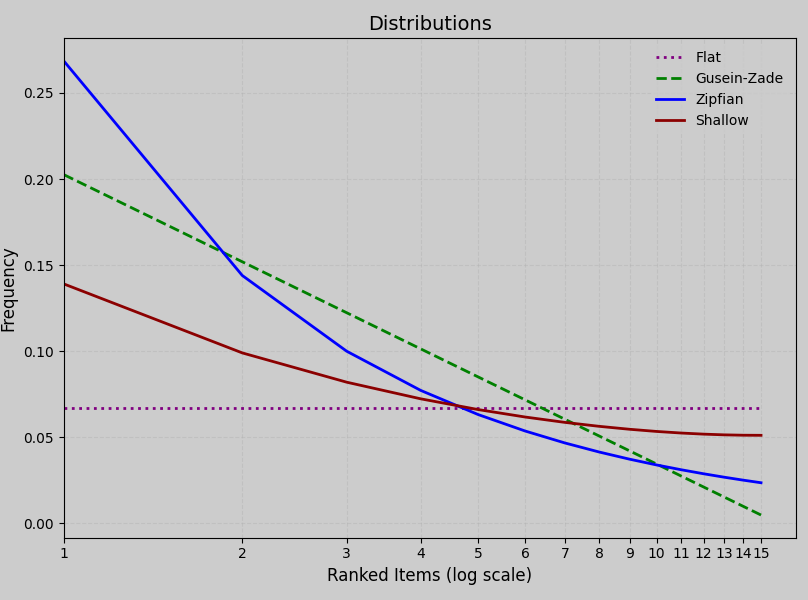
You can change these default distributions (another name for this might be "default drop-off", but I digress). For categories, the default is gusein-zade. For the separate decorator for word-shapes, the default is zipfian. The distribution will be applied to each item in a set, and then recursively to any set that set is nested in (treating the nested set as an item), then applied at the surface level.
distribution can be either:
- A
zipfiandistribution approximates natural language frequency for words, where the highest-ranked item receives the greatest weight, and subsequent ones decay steeply until flattening out. - A
gusein-zadedistribution offers a gentler slope that is natural across phonemes in a language, following a logarithmic decay that still prioritizes top-ranked items but spreads weight more evenly Shallowdistribution, the red-headed step-child of the distributions. It doesn't occur in natural linguistics, but offers us something between Flat and Gusein-Zade. It is Zipfian in nature, a 'long-tailed Zipfian distribution'- A
flatdistribution treats all items equally. This is not to say the items will be evenly chosen -- items are still being randomly chosen on a generation, they just have the same weight
5.6Assigning weights
If you want to set your own frequency for graphemes in a category or category-set, items in a pick-one-set, or optional-set, or word-shapes in the words directive, you can use an asterisk * to specify the weight for each item, like so:
:
V = a*5, e*4, i*3, o*2, u*1
units:
$ = {V*8, x*2}
words:
<$>*2, yV has approximately the following probabilities: a: 33%, e: 27%, i: 20%, o: 13%, u: 7%. The pick-one-set in the $ unit has an 80% chance of producing a V category over the x grapheme. And the first word-shape in the words directive has twice the chance of being chosen over the next word-shape.
As you might have noticed in the example above, in a sequence that has at least one weighted option, it overwrites any default distributions. Also important to note is that any other option that you had not given a weight (inside that set, or on the surface level), is given a weight of 1.
6The alphabet directive
The alphabet directive gives Vocabug a custom alphabetisation order for words, when the sort words checkbox is selected.
:
a, b, c, e, f, h, i, k, l, m, n, o, p, p', r, s, t, t', yThis would order generated words like so: cat, chat, cumin, frog, tray, t'a, yanny
7The graphemes directive
The graphemes directive tells Vocabug which (multi)graphs, including character + combining diacritics, are to be treated as grapheme units when using transformations.
:
a, b, c, ch, e, f, h, i, k, l, m, n, o, p, p', r, s, t, t', yIn the above example, we defined ch as a grapheme. This would stop a rule such as c -> g changing the word chat into ghat, but it will make cobra change into gobra.
8The stage directive
Once words are generated, you might want to modify them to prevent certain sequences, outright reject certain words, or simulate historical sound changes. This is the purpose of transforms, which are all declared in the stage directive:
:
; Your transforms go hereThe default transform is a rule. These should be familiar to anyone who knows a little about phonological rules. The other types of transform are cluster-fields.
When this document uses examples to explain transformations, the last comment shows an example word transforming. For example ; amda ==> ampa means the rule will transform the word amda into ampa
9The change
The format of a rule's CHANGE can be expressed as TARGET -> REPLACEMENT.
TARGETspecifies which part of the word is being changedREPLACEMENTis whatTARGETis changing into, or in other words, replacing
Let's look at a simple rule:
o -> x
; bodido ==> bxdidx
In this rule, we see every instance of o become x.
9.1Concurrent change
Concurrent change is achieved by listing multiple graphemes in TARGET separated by commas, and listing the same amount of replacement graphemes in REPLACEMENT separated by commas. Changes in a concurrent change execute at the same time:
o, a -> a, o
; boda ==> bado
Notice that the above example is different to the example below:
a -> o
; boda ==> bodo
where each change is on its own line. We can see o merge with a, then a becomes o.
9.2Merging change
Instead of listing each REPLACEMENT in a concurrent change, we can instead list just one that all the TARGETs will merge into:
o, a -> x
; boda ==> bxdx
This is equivalent to:
o, a -> x, x
; boda ==> bxdx
10Reject
To remove, or in other words, reject a word, you use a zero 0 in REPLACEMENT:
In the above example, any word that contains a or bi will be rejected.
11Deletion
Deletion happens when ^ is present in REPLACEMENT:
12Alternator and Optionalator
These cannot be nested.
12.1Alternator-set
Enclosed in curly braces, { and }, only one Item in an alternator set will be part of each sequence. For example:
The above example is equivalent to:
12.2Optionalator-set
Items in an optionalator, enclosed in ( and ) can be captured whether or not they appear as part of a grapheme or as part of a sequence of graphemes:
x(w) -> k
; xwaxaħa ==> kakaħa
Optional-set can also attach to an alternator-set:
{x, ħ}(w) -> k
; xwaxaħa ==> kakaka
Optionalator-set cannot be used on its own, it must be connected to other content.
13Cluster-field
Cluster-field is a way to target sequences of graphemes and change them. They are laid out as tables. The first part of a sequence is in the first column, and the second part is in the first row. For example:
- In this example,
npbecomes mp andmtbecomes nt +means to not change the target cluster at all- Cluster-fields can use
0to reject the word if it contains that sequence - Cluster-fields can use
^to delete the target sequence - These are executed concurrently just like concurrent changes. Their order does not matter